
PRO1 Connect
PRO1 IAQHouse & Home
4.3289.00 Reviews
- Version
- 2.2.1+2996
- Installs
- 50.00K
- Age Rating
- Everyone
Screenshots
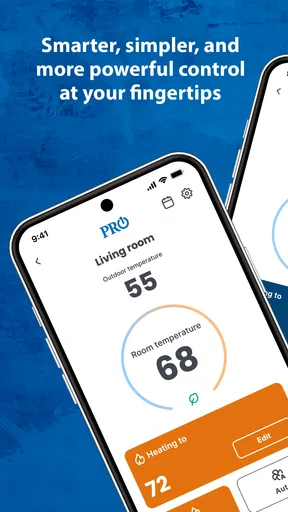
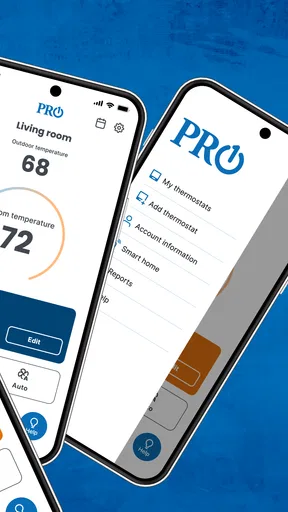
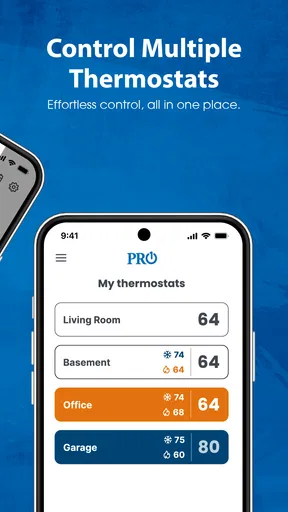
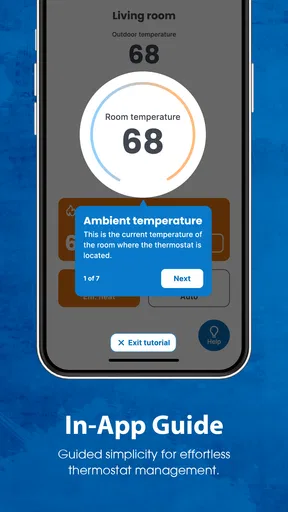
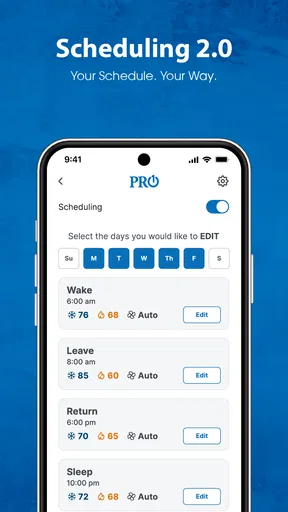
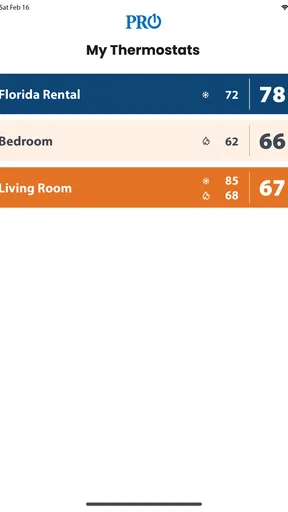
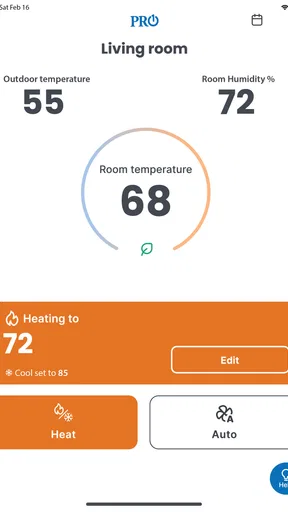
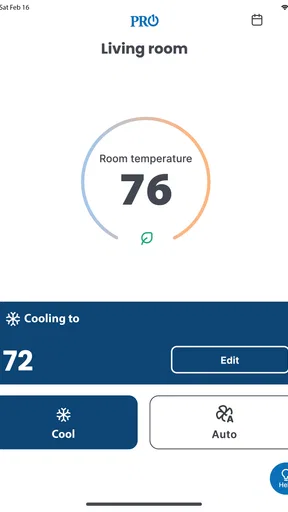
Our Review of PRO1 Connect
 Analysis by Appyee
When the temperature at home is wrong, the problem is rarely just comfort. Someone is too warm, someone else is reaching for a blanket, and the thermostat becomes a small source of daily arguments. I tested PRO1 Connect with that kind of shared household situation in mind. It is a free House & Home app from PRO1 IAQ, designed to set up and control a compatible PRO1 thermostat from a mobile device. That last word matters: the app is useful only when the thermostat in your home is one of the compatible models.
My overall impression is that it makes remote thermostat control feel more practical than dramatic. It does not try to be a complete smart-home command center. Instead, it focuses on the relationship between the phone and the thermostat. That narrow purpose is also its main strength: if your household already uses compatible PRO1 equipment, the app can reduce trips across the house and make temperature changes easier to coordinate. If you are looking for broad automation, appliance control, or a universal thermostat tool, I would look elsewhere.
How it fits a shared household
The most convincing use case is a home where several people share responsibility for the temperature. Imagine leaving for work while another person stays home, or having a child return from school before you do. With a compatible thermostat and this app, the person who has access to the account can adjust the setting without calling someone in the house to find the wall control. That is a small convenience, but it becomes meaningful when the thermostat is upstairs, in a hallway, or in a room nobody wants to enter repeatedly.
I also found the app more useful for coordination than for constant adjustment. A household can agree on who handles changes and when, rather than having everyone independently alter the thermostat. That arrangement avoids the familiar cycle in which one person changes the temperature, another changes it back, and nobody knows what happened. The app does not replace a household agreement, but it gives the responsible person a convenient way to carry it out.
There is an important boundary here. A phone application does not make a thermostat universally controllable. The hardware still has to be compatible, and the initial setup still depends on the thermostat and the home network working together. Before relying on it during a trip or a busy week, I would first complete setup while standing near the thermostat. That lets you confirm that the correct device responds and that the people who need access understand the arrangement.
For shared-device use, I would treat the account as a household tool rather than something to pass casually between every family member. If several people use one phone, the person opening the app should know exactly which home device is being controlled. A mistaken adjustment is easy to make when multiple homes or devices appear familiar, especially if the user is in a hurry. Clear naming and a simple house rule about who makes changes are more valuable here than adding the app to every phone automatically.
What setup feels like in practice
The first step is identifying whether the thermostat is compatible. This is the point where many users can save time: do not begin by downloading the app and assuming any PRO1 wall unit will work. Check the model information on the thermostat or its documentation first. Once compatibility is established, the app is intended to guide the connection between the mobile device and the thermostat. I recommend doing this during a quiet moment, not when the house is already uncomfortable and everyone is waiting for heat or cooling.
The setup boundary is also a useful security boundary. The person who performs the initial connection effectively becomes the person who knows how the household control is organized. That may be the homeowner, a partner, or a trusted adult. I would avoid setting it up on a temporary phone unless that phone is genuinely going to remain part of the household arrangement. Moving control later can be more inconvenient than choosing the right primary device at the beginning.
Because the app’s purpose is tied to a physical thermostat, the wall unit remains the fallback. If the phone is unavailable, the battery is empty, or the connection is not behaving as expected, the household should still know how to use the thermostat directly. I see this as a practical advantage rather than a weakness: the app supplements the control already installed in the home instead of making the phone the only possible way to manage comfort.
One useful habit is to test a small, harmless change immediately after setup and then return the thermostat to the preferred setting. This confirms that you are controlling the intended device and gives everyone a shared point of reference. It also exposes confusion early, such as a family member expecting the app to control a different thermostat in another part of the property. That kind of test is more useful than simply assuming a successful installation means the household is ready.
The current version is 2.2.1+2996, and the app supports devices running Android 7.0 or later. That makes it accessible on many older Android phones, which is helpful in a household where the person responsible for the thermostat does not use a recent device. Still, compatibility with the phone is only one part of the picture. The thermostat model and the home’s connection are just as important, so I would not judge suitability from the operating-system requirement alone.
Sharing control without losing accountability
In my experience, household technology works best when access and responsibility are not treated as the same thing. Giving every resident the ability to change the temperature may sound convenient, but it can also create uncertainty. If the home is empty and the setting changes, who made the decision? If the bill rises, was it an intentional adjustment or an accidental tap? With a focused thermostat app, it is sensible to decide whether the goal is broad convenience or controlled coordination.
For a couple, one shared account or one primary phone may be enough. For a larger household, I would establish a simple routine: one person handles planned changes, while others mention comfort problems rather than repeatedly adjusting the control themselves. This is not a feature claim about the app; it is a way to use a single-purpose tool without turning it into a source of conflict. The app can make the action easier, but it cannot decide which household preference should win.
This matters particularly when people have different schedules. Someone working overnight may need a different environment from someone leaving early in the morning. The practical solution is to agree on the times when changes are acceptable and to use the app for deliberate adjustments, not constant back-and-forth corrections. I like the app more in that role because it encourages the thermostat to be treated as a shared household setting rather than a personal remote control.
Another realistic scenario is a family member who is away from home but still responsible for checking the house. Remote access can be useful for a planned change before people return, but I would not assume that every remote action will succeed under every network condition. I would verify the connection before depending on it for an important arrival. If the household cannot confirm that the thermostat responded, someone nearby should remain the reliable backup.
That trade-off separates PRO1 Connect from a traditional wall thermostat. The wall control is immediate when you are beside it and does not require a phone interface. The app is more convenient when you are elsewhere, but it introduces another layer: the phone, the app, the connection, and the compatible thermostat must all cooperate. For me, the app earns its place when remote convenience solves a real problem, not simply because controlling a wall device from a phone sounds modern.
Age, trust, and everyday access
The content rating is Everyone, which fits the app’s household purpose. There is no reason a family should view it as an age-restricted product, but that does not mean every child should automatically receive unrestricted control. Temperature settings affect everyone in the home, and a younger user may not understand why a small adjustment matters over several hours. I would let children ask for a change or help with the app under supervision, while keeping the main account with a trusted adult.
This is less about formal parental controls and more about practical trust. The app should not be presented as a toy remote. A child who knows how to open it may still need guidance about when changes are appropriate, which device to select, and how to return to the agreed household setting. The same advice applies to guests: temporary access is not automatically necessary just because someone is staying in the home.
Older relatives can benefit from the app when moving around the house is difficult or when the thermostat is placed somewhere inconvenient. However, a smartphone interface may be less comfortable than the physical control for someone who prefers large, familiar buttons. I would introduce the app as an optional convenience rather than forcing it to replace the wall thermostat. Showing the person the basic workflow once, then leaving the physical control available, creates a much gentler transition.
For roommates, trust becomes even more important. If everyone pays toward household costs, shared access may seem fair, but unrestricted changes can still create disagreements. I would decide in advance whether the app belongs to one designated person or whether everyone may use it. The best arrangement depends on the household, and the app should support that decision rather than silently becoming the default authority.
Privacy expectations also deserve a realistic explanation. This is a control app for a compatible thermostat, not a family communication platform. It will not solve disagreements, explain why someone changed a setting, or replace a conversation about comfort and responsibility. Its value is operational: it gives an authorized household member a way to interact with the heating or cooling control through a mobile device.
Where it is stronger than ordinary alternatives
The ordinary alternative is to walk to the thermostat. That remains the simplest option when the wall control is nearby, and it avoids phone setup entirely. PRO1 Connect becomes more appealing when the person making the adjustment is in another room, outside the home, or managing the household from a distance. The difference is not a long list of extra features; it is the convenience of putting the existing thermostat control within reach of the phone.
Another alternative is a broader smart-home platform. Those systems may be preferable for someone who wants one place to manage lights, security equipment, sensors, and climate devices. I would not choose this app expecting that kind of ecosystem. Its focused design is easier to understand for a household that only needs control of a compatible PRO1 thermostat, but it is less suitable for someone building a large connected-home setup.
Compared with a universal thermostat application, the key trade-off is equipment dependence. A universal option may make more sense for a renter or a household with mixed brands, while PRO1 Connect is the more direct choice for a home already using supported PRO1 hardware. The app is not a reason by itself to replace a working thermostat. The hardware relationship comes first, and the mobile convenience comes second.
I also prefer this kind of focused tool to a complicated automation system when the household only needs occasional adjustments. A family member can use it to prepare the home before returning, check the setting as part of a routine, or avoid disturbing someone in another room. But if your main goal is advanced scheduling, detailed energy analysis, or coordination across unrelated devices, you should compare other options before committing to this narrower approach.
Small habits that make the app more useful
My first recommendation is to make the initial setup a shared household moment. The person who installs the app should tell the other responsible users what the app controls and what remains on the physical thermostat. That prevents the common misunderstanding that installing it automatically gives control over every heating or cooling unit in the property.
Second, use it for intentional transitions rather than minute-by-minute tinkering. For example, adjust the setting before people leave, before they return, or when a known schedule changes. This reduces the chance that one person’s temporary preference becomes the household’s unnoticed setting. It also makes it easier to remember why a change was made.
Third, keep the wall thermostat familiar to everyone. In a shared home, a phone can be misplaced, forgotten, or unavailable. A household that knows both control methods is more resilient than one that depends entirely on a single account or handset. This dual approach is especially useful when guests, children, or older relatives are present.
Finally, if the app seems not to respond, check the physical situation before repeatedly tapping the screen. Confirm that the correct thermostat is selected, that the phone is connected as expected, and that the wall unit itself is behaving normally. Repeated commands without understanding the problem can create more confusion, particularly when several people are watching the temperature change.
What the user community suggests
The app has an average rating of 4.3 from around 540 ratings, with more than 280 written reviews. I read that as a sign of generally positive reception, but not as a promise that every household will have a friction-free experience. Thermostat apps are unusually dependent on the exact hardware and home conditions, so one person’s smooth setup may not perfectly predict another person’s experience.
It has passed 50,000 installs, which gives it a meaningful user base without making it feel like a universal household standard. The developer is PRO1 IAQ, and the app is free to install. For a homeowner who already has compatible equipment, that makes testing the mobile control relatively low-risk. The real decision is whether the added convenience justifies the setup and the need to manage access responsibly.
Because the app is rated for Everyone, I can see why it fits a family environment, but I would still keep account decisions adult-led. The age label describes suitability of the app’s content; it does not determine who should control the home’s temperature. That distinction is easy to overlook when a simple interface makes the action feel harmless.
Who should use it and who should skip it
I would recommend PRO1 Connect to someone who already owns a compatible PRO1 thermostat and wants a straightforward way to control it from a phone. It is particularly worthwhile for homes where the thermostat is inconveniently located, where one person manages comfort for others, or where remote adjustments would make arrivals and departures easier. It also suits households that prefer a focused app over a larger smart-home system.
I would skip it if your thermostat is not compatible, if you do not need remote access, or if everyone in the household is perfectly happy using the wall control. I would also look elsewhere if your priority is a broad automation platform, detailed home-energy management, or control of several different brands from one interface. Those needs go beyond what this app is designed to do.
Renters should be especially practical. If the landlord installed a supported PRO1 thermostat and permits mobile setup, the app may be useful during the tenancy. But I would confirm that connecting an account is acceptable and make sure the arrangement can be handed back cleanly when moving out. The app can improve daily comfort, but it should not create confusion about who owns or administers the thermostat.
My household verdict
After using it as a household control rather than treating it like a novelty, I see PRO1 Connect as a useful companion for the right PRO1 thermostat. Its best quality is restraint: it concentrates on making an existing climate control easier to reach from a phone. That makes it approachable for everyday shared use, especially when one trusted person needs to coordinate the setting for everyone else.
The limitations are equally clear. Compatibility comes before installation, phone control depends on a working connection, and the app cannot settle household disagreements or replace the physical thermostat. Shared access should be planned rather than handed out casually, and children or guests may need guidance even though the app is suitable for Everyone.
PRO1 Connect is free, runs on Android 7.0 and later, and has been available since May 29, 2019. Those details make it approachable for many existing Android users, while the current version, 2.2.1+2996, gives prospective users a clear point of reference when checking their device. My recommendation is simple: if your home already has compatible PRO1 equipment and remote convenience would genuinely help, install it and test the connection before you need it. If you only want a universal smart-home hub, stay with a broader alternative instead.
Verdict
Strengths of PRO1 Connect
- Simple way to connect with PRO1 smart thermostats remotely.
- Makes temperature adjustments convenient when you are away from home.
- Clean interface keeps essential thermostat controls easy to find.
- Can help manage heating and cooling routines from one mobile app.
- Useful for checking and changing settings without visiting the thermostat.
Limitations of PRO1 Connect
- Requires a compatible PRO1 thermostat to provide any real functionality.
- Remote features depend on a stable internet connection.
- Some advanced thermostat options may still require on-device access.
- Performance can vary if the thermostat or app loses connectivity.
- Limited usefulness for households without PRO1-compatible heating equipment.
Similar Picks in This Category
View All
Universal TV Remote Control
CodeMatics Media Solutions3.9

AlfredCamera Home Security app
Alfred Systems Inc.4.7

Planner 5D: AI Home Design
Planner 5D4.5

Universal Tv Remote-Cast to TV
One Music Player4.1

Zillow: Homes for Sale & Rent
Zillow Group4.8

99acres Buy/Rent/Sell Property
infoedge.com4.3
Frequently Asked Questions
What is PRO1 Connect, and what is it used for?
PRO1 Connect is a companion app designed to work with compatible PRO1 smart thermostats and home climate-control systems. After pairing the thermostat with the app, users can typically view the current temperature, adjust heating or cooling settings, change the target temperature, and manage schedules remotely. Its usefulness depends on owning a supported PRO1 device and having a stable internet connection for remote features.
How do I connect PRO1 Connect to my thermostat?
To connect PRO1 Connect, install the app on your Android or iOS device, create or sign in to an account if requested, and follow the in-app setup instructions. You will generally need access to the thermostat and your home Wi-Fi details. Put the compatible thermostat into pairing or setup mode, select it in the app, and complete the connection steps. Keeping your phone near the thermostat can make setup easier.
Does PRO1 Connect work with every PRO1 thermostat?
No, PRO1 Connect is intended for compatible PRO1 connected thermostats rather than every thermostat made by the brand. Compatibility may depend on the exact model, installed equipment, firmware, and regional availability. Before downloading, check the thermostat model number and compare it with the supported-device information provided by PRO1 or your installer. A standard non-connected thermostat may not offer app-based remote control.
Can I control my home temperature remotely with PRO1 Connect?
When the thermostat is compatible and successfully connected to the internet, PRO1 Connect can generally let you monitor and adjust climate settings while you are away from home. You may be able to change the setpoint, switch operating modes, and review or modify schedules. Remote access requires both the thermostat and your mobile device to be online, and some functions can vary according to the installed HVAC system.
Is PRO1 Connect free, and what should I do if it does not work?
The PRO1 Connect app is generally available to download without a separate app purchase, although normal internet, mobile-data, or smart-home service costs may apply. If the app cannot connect, check that your thermostat model is supported, Wi-Fi credentials are correct, and the thermostat has power. Updating the app, restarting the thermostat and router, and repeating the pairing process can often resolve setup problems.
